WARNING
********
Never try to copy the database file (DATA.FDB) while the AMS server is in production (running). Attempting to copy this file while AMS Server is running may corrupt the database
Do not uses a third party backup software to backup the database file (DATA.FDB)
AMS is setup to perform its own database backup and record the backup files to a customer’s defined location (using AMS Manager).
The backup file generated by AMS Manager (DATA.GBK) can be included in your corporate backup policy, using third party backup software.
********
Your database (the file « DATA.FDB » located on your AMS Server) requires to be maintained in order to keep it efficient and free from unnecessary data (uncommitted transactions). This procedure is recommended (optional) as the database is also verified for data consistency by AMS Manager during the overnight maintenance.
This procedure is a database cleaning method deleting all uncommitted transactions which may take a significant disk space, and to optimize the database execution speed. It is recommended to perform this operation every 3 to 6 months, and when the database file size exceeds 3 times the size of the backup file (DATA.GBK).
1-Ensure that no client (AMS of SMS) is connected to the server
2- Use the Manager (figure bellow) to execute a backup of your database:
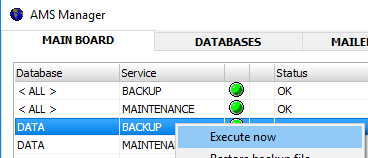
4- Restore the backup file using the Manager (select the contextual option « Restore backup file »).
Note : The backup file is located in the directory <BACKUP>\DATAX where:
DATA : is the name of your database
X : is an integer value representing the day of the week (1= Monday / 7 = Sunday)
Note : This backup restore process will not overwrite your database file (ref below)
5- The restored database file has been generated into the server database directory (generally AMS\AMS_Server\DATA\DATA_RES.FDB). To activate this new database file :
-Move the file DATA.FDB to another folder for backup
-Rename the file DATA_RES.FDB to DATA.FDB
6- Your database is now cleaned and operational.
WARNING : Before putting this database into production (and before deleting the original database file which was saved as per step 5 above), ensure the data you just restored are the latest data and are not coming from a backup file of a few days back (if the .GBK file restored was not the last backup file, users may take several hours before realizing the situation)