Manage your Export Control procedures:
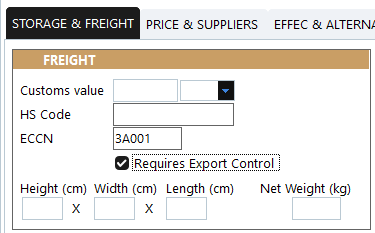
To ensure that no part can be shipped out without being approved for export first, the box "Requires Export Control" must be ticked:
Export process:
When a part is required to be exported, assign this part by recording an assignation (ASS):

If the box "Requires Export Control" was ticked for this P/N, the "Export status" field (right side of the above figure) is set to "Export Requested". if the "Requires Export Control" option was not selected, the user entering the assignation document can still request export approval by selecting this status.
When Export Control is requested (ASS with "Export Requested"), all users having an active subscription to the "Export Control" notification will receive a notification (both in their AMS interface and by email).
Once a part is under a request for export, it cannot be shipped (no M.OUT allowed)
The ASS module can be used to browse all Export requests by their export statuses
Users having the "Approve Export" right can make a decision and record it in the column "Export Status"
Only when the export request is accepted, the part can be shipped out