AMS is a multi currencies application.
Use this function to set your default currency (see Note 1) and specify the conversion rates to the other currencies.
Note 1: Do not change the default currency unless required to do so. Changing the default currency may have strong consequences on the costs and prices already recorded in AMS and such consequences depends on your original default currency (a re-certification of the entire software is required each time the default currency needs to be changed whereas the database is not new)
Note 2: any other currencies could be added on request
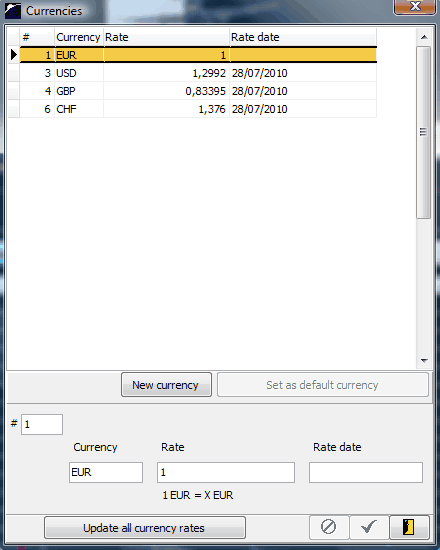
The "Update all currency rates" function is automatically executed every day by the AMS Server (the button is only provided here for stand alone use of AMS). This function updates all rates by getting the newest rates from the central banks, provided that your default currency is one of the following:
EUR Euro
USD US dollar
JPY Japanese yen
BGN Bulgarian lev
CZK Czech koruna
DKK Danish krone
EEK Estonian kroon
GBP Pound sterling
HUF Hungarian forint
LTL Lithuanian litas
LVL Latvian lats
PLN Polish zloty
RON New Romanian leu
SEK Swedish krona
CHF Swiss franc
NOK Norwegian krone
HRK Croatian kuna
RUB Russian rouble
TRY Turkish lira
AUD Australian dollar
BRL Brasilian real
CAD Canadian dollar
CNY Chinese yuan renminbi
HKD Hong Kong dollar
IDR Indonesian rupiah
INR Indian rupee
KRW South Korean won
MXN Mexican peso
MYR Malaysian ringgit
NZD New Zealand dollar
PHP Philippine peso
SGD Singapore dollar
THB Thai baht
ZAR South African rand