AMS is a client / server application. Your connection with the server is secured by a login and password defined by your AMS administrator.
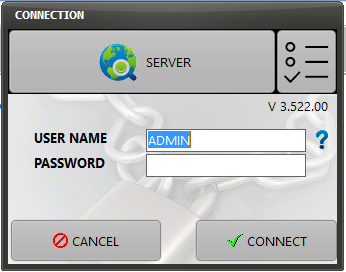
Before you make your first connection, you must specify your "connection details" to establish a first connection to an AMS Server:
Click the SERVER button.
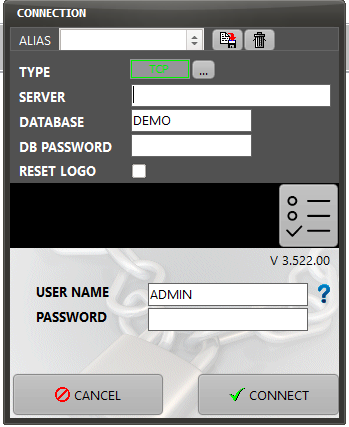
ALIAS:
You can create connection aliases (optional) to several AMS Servers or to several databases on the same server. To create a connection alias, fill the required fields as per the below instructions (Type / Server / Database / Password) then give a name to your new alias (in the alias field) and click on the "create alias" button

You can also create different shortcuts to AMS Clients with different command to different aliases. (see the "user defined interface" chapter to know how to run AMS with commands)
Command to pre-select an alias: a:<Alias Name>
note: remove the <> characters
TYPE:
Connection type (TCP or HTTP), default TCP. This parameter is defined by your AMS administrator
SERVER:
[SERVER NAME or IP ADDRESS][:PORT]
This parameter is defined by your AMS administrator
Example: "WST-AMS:217" or "192.168.17.12:8081"
Note: the IP address to connect to your own computer as an AMS Server is 127.0.0.1
DATABASE:
Name of the database to connect to.
This parameter is defined by your AMS administrator
Note that you can connect to several databases located on the same server
DB PASSWORD:
This field is required if a database password has been set on the AMS Server.
This parameter is defined by your AMS administrator
USER NAME:
This is a unique string identifying your personal account on AMS. The USER NAME field is always preset using the session name of Microsoft Windows
This parameter is defined by your AMS administrator
PASSWORD:
You can change your own password after you first connect with the password defined by your administrator (Security / Change my password)
This parameter is initially defined by your AMS administrator
Note 1: After your first successful connection, your connection details are saved locally (on your computer). There is no need to get back to the connections details except if you want to connect to a different server or a different database.
Note 2: If a database password has been defined, it is also saved locally but it is encrypted with a local encryption key. This encrypted key cannot be used on another computer.
Clicking the Connection options presents clicking the following :
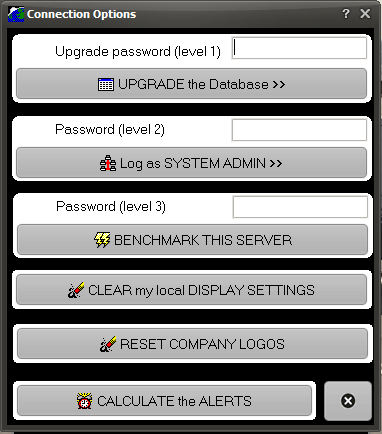
Access to these settings is permitted on input of correct passwords.