Warranty Claims are handled using the CLAIM.in & CLAIM.out modules:
- CLAIM.in are claims received from your Customer
- CLAIM.out are the claims submitted to your Suppliers
Warranty Claim Management
Warranty Claims are relatively easy to manage once the claim-ability of a component defect as been identified. The claim process (recording a component claim, providing support documentation, receiving a credit note or other forms of compensation) is specific to each OEM and Supplier (they usually have a web site which is used to record and track claims).
The fundamental step which is commonly overlooked is the detection of claimable component defects and this is where iCare AMS steps in. Situations where a warranty claim could be initiated are:
1/ When preparing and reviewing the monthly reliability report (applicable to Airlines and CAMO). This report includes the unscheduled component removals together with the component life data at the time of removal. This is the first opportunity to detect a potential claim.
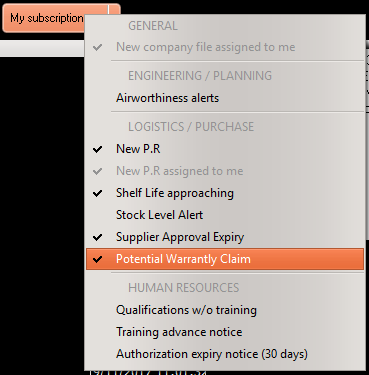
2/ iCare AMS is reviewing the component removal tags during the overnight maintenance (refer to the AMS Installation Manual to ensure the Manger is configured to compute the Alerts & Notifications) to detect potentially claimable component failures. To receive these notifications, subscribe to the "Potential Warranty Claim" notice using the "My subscriptions" button on the main page:
Claim non related to a purchase / sale order
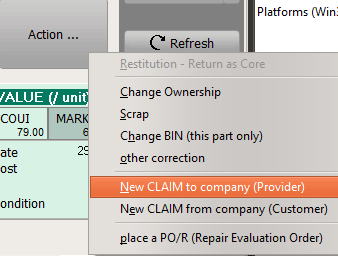
The above 2 claim categories can be recorded directly from the Part/Batch module by selecting the "Action" button and the relevant claim category, as per the bellow screen shot. Use this option when the claim is not related to an existing sale or purchase case in the LOG/PURCHASE modules (for example for a claim raised to the OEM when the related component was delivered new as part of an aircraft delivery)
Claim related to a purchase / sale order
If the claim is related to an existing sale or purchase order in the LOG/PURCHASE modules, select the PO, PO/R, PO.in, as the case arise, then right click on the concern row item and select CLAIM.in - Generate / CLAIM.out - Generate (as applicable) to record the claim.