|
DISPLAY |
DESCRIPTION |
|---|---|---|
1 |
|
This section show the valuation parameters (user defined) |
2 |
|
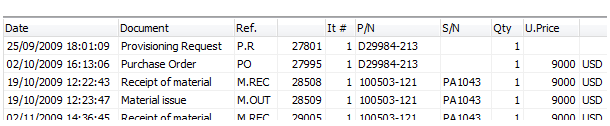
This section shows the part history (ordered chronologically) and the value associated with each document
|
3 |
|
This valuation result section displays the resulting values (Acquisition Cost & Current Market Value)
All prices are per unit. |
4 |
|
If you are not in agreement with the above values, or if the above values are not defined (for example because the part was removed from aircraft and there is no purchase history), you can post a declaration of value. For each posted declaration, you must enter the type of declaration ( Acquisition Cost or Market Value), the date, the condition of the component for this value, and the value.
Note: The above condition is not related to the current condition of the component: The current condition of the component could be SVC (Serviceable) and you are posting a declaration of value for this component in NEW condition. In this case iCare AMS will compute the actual value based on the current component condition
To save your data, press the "Apply" button.
|
5 |
|
Closes this window |