The Customs status of each part is managed using the AWB module and the Part/Batch module:
1/ Entering the Customs Status
1.a/ AWB
When an AWB is created or updated, the Customs Status of every part included in this AWB is automatically updated to reflect the global Customs Status of the AWB:
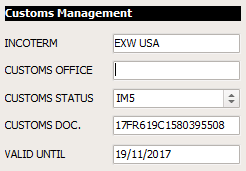
Note 1: In most cases, the complete details (including Serial Numbers) of parts being shipped under an AWB is unknown when the AWB is created (for example when a Purchase Order has been placed and your forwarding agent picked the parts up). The actual parts will recorded, and their Customs Status will be initialized, when the parts will be received (MREC)
1.b/ Part/Patch
When a part has been received and was included into an AWB, its Customs Status is reflecting the Customs Status of the associated AWB, as show in this example:
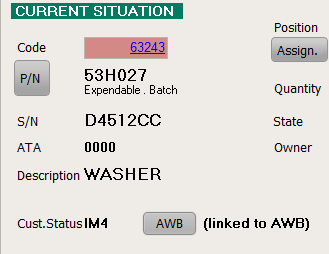
Click on the "AWB" button to display the associated AWB. "(linked to AWB)" means the Customs Status is reflecting the status of the AWB, as opposed to specifically stating the Customs Status of this part.
To change the Customs Status of a part, click on the "Action" button and select "Customs Status". The following windows is displayed:
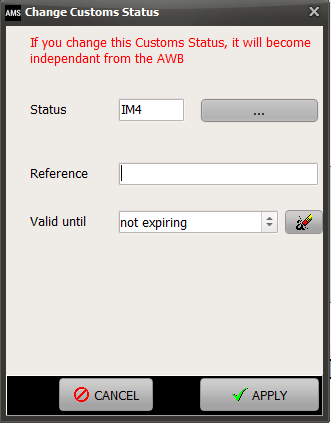
As stated on top of this window, specifying a Customs Status for this part will break the link to the AWB. In other words, changing the Customs Status of the entire AWB will no longer update the Customs Status of this part.
2/ Retrieving parts in a specific status
2.a/ using the AWB module
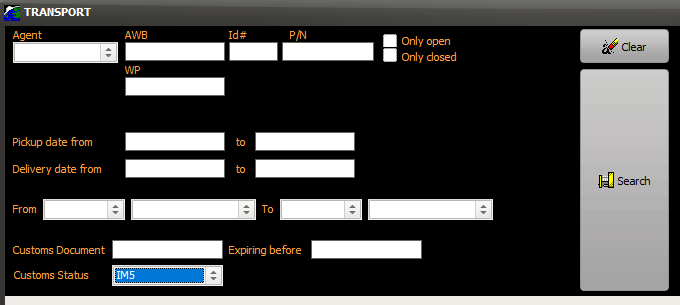
To isolate all AWB in a specific Customs Status, proceed as follows:
Select the AWB module (for general use, refer to the AWB section of this manual), and click on the "more options" button. Enter the desired Customs Status then click on the "Search" button
2.b/ using the Part/Batch module
To isolate all parts in a specific Customs Status, proceed as follows:
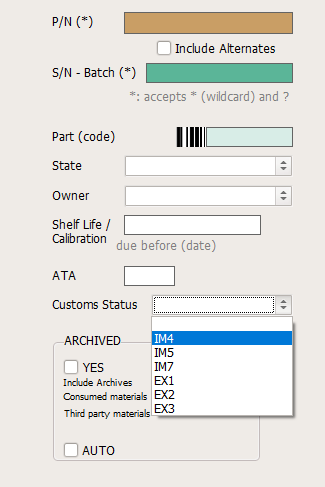
Select the Part/Batch module (for general use, refer to the Part / Batch section of this manual), enter the desired Customs Status before clicking on the "Search" button
3/ Customizing Customs Status
By default, the Customs Status loaded in iCare AMS are the WTO code-names. It is important to set the Customs Status to mirror the status applicable in your specific Customs environment. Contact our support department to load your specific statuses by populating the table TGENCUSTOMS