IMPORTANT: Before you can use the "Contractual Service" module, the available services must be defined in your general settings ( Maintenance / Line Maintenance Services )
To open the "Service" section of a contract, browse to the desired "Customer Contract" and double click on it (or click of the "View Services" button):
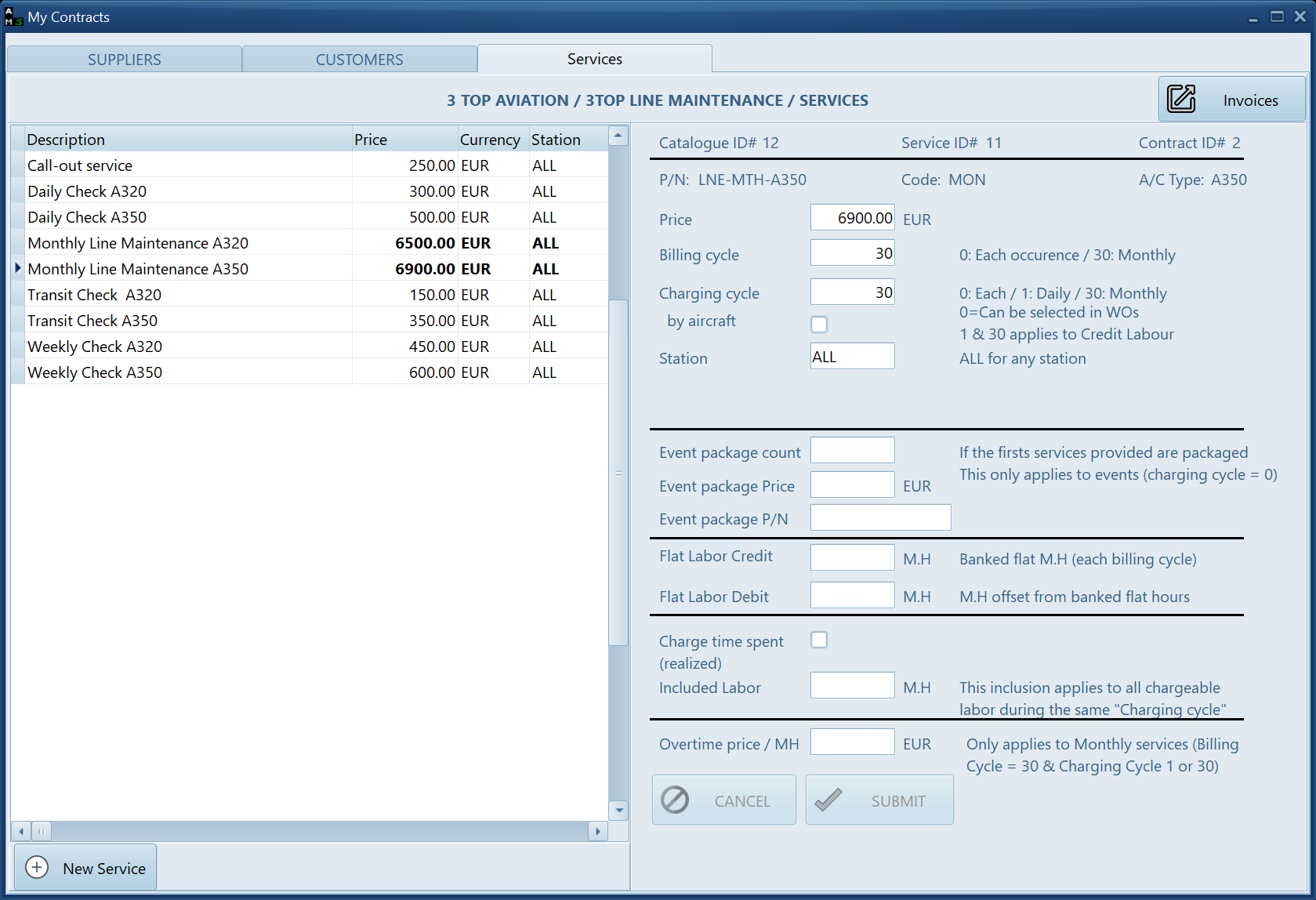
Primary fields:
| - Billing Cycle: | determines when the service is invoiced |
| 0: at each service occurrence |
| 30: Monthly |
| - Charging Cycle: | determines how the service is quantified |
| 0: the engineer need to select the service on the WO every time the service is supplied |
| 1: the price is a daily charge (exceedance will start if the time spent exceeds the "Credit Flat Labor" or "Included Labor" divided by 30.43 (the number of days in a month) |
| 30: the price is a monthly charge (exceedance will start if the monthly labor exceeds the "Credit Flat Labor" or the "Included Labor" |
- Flat Labor Credit: The number of "Flat Hours" credited at each billing cycle. "Flat Hours" is a predefined duration (generally agreed by a contract), as opposed to "Time spent". If this field is defined, there should be no value for the field "Debit Flat Labor" and the field "Included Labor". If this field is defined then the field "Price" should also be defined (the "Price" charged is balanced by the Flat Labor to be supplied)
- Flat Labor Debit: The number of hours debited from "Flat Hours" each time the service is provided. In this case the "Charging cycle" is meant to be "0" as this number of hours will be offset each time the service is provided
- Charge time spent: Tick this box when the service is charged using the real time spent (not "Flat hours"). Flat Hours fields should be empty when this box is ticked
- Included Labor: The quantity of labor (M.H) to be offset from the real time spent, when the box "Charge time spent" is ticked. This field can be left blank when there is no offset. When "Charging Cycle" = 1 this "Included Labor" is evenly distributed on each day (the number of M.H included for each day is the "Included Labor" divided by 30.43. When "Charging Cycle" = 30 this "Included Labor" is available anytime during the month (the total included labor can be spent in one day or throughout the month)
- Overtime price: This is the price per M.H to be charged when the monthly labor exceeds the "Flat Labor" credit or the "Included Labor"
Main Service management modes:
Monthly service (not labor related)
Examples: Pool Access Fees, Service License Fees, Inventory rental, ...
Billing Cycle = 30
Charging Cycle = 30
Flat Labor Credit = 0
Flat Labor Debit = 0
Monthly services, daily equalized labor
Examples: Line Maintenance service when it is considered that a maximum daily charge should not be exceeded without being charged.
Billing Cycle = 30
Charging Cycle = 1
Flat Labor Credit : The number of flat Men.Hours the customer is credited with (flat time credit)
Included Labor : same (but mutually exclusive with "Flat hours")
Monthly services, global labor utilization
Examples: Line Maintenance service when it is considered that a man.hour not consumed can be consumed the following day without surcharge
Billing Cycle = 30
Charging Cycle = 30
Monthly Time & Material services
Examples: Any type of service typically called "Time & Material".
Billing Cycle = 30
Charging Cycle = 0
Flat Labor Credit = blank
Included Labor = blank
Charge time spent = checked
Event based
Example: Call-out service on request, the 3 first event having a different price
Price = the price to be charged for each event (or additional event)
Billing Cycle = 30
Charging Cycle = 0
Flat Labor Credit = blank
Flat Labor Debit = blank
Event package count = the number of events covered by the package price (can be blank)
Event package price = price for the above count of events (can be blank)