To manage your supplier and customer contracts, AMS provides 2 interfaces:
1/ Contact Manager ( Contact manager ):
Use the Contact Manager to view and update your contracts (suppliers and customers) with a company-by-company view of all contracts (belonging to any department)
This management level requires the "Contact Manager (use)" and "Contact Manager (modify)" user privileges. This is typically the level of access of the department in charge of controlling contract management processes on a company wise level (Quality / Safety department or any designated department having a global visibility on all contracts)
2/ My Contracts
General description & initial settings
This module is dedicated to the heads of departments (process owners) or the individual having delegation to manage a department.
To use this functionality, a user shall be identified as "Department Manager" as per this example:
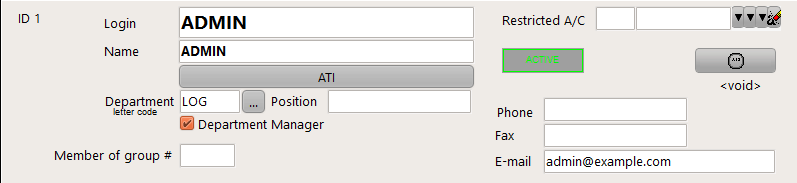
Example: This "ADMIN" user is identified as Manager of the "LOG" department
Note 1: The email address is an important field as it will be used to send automated notification to this user
Users identified as "Department Manager" can view and modify the contracts associated with this department only. They cannot view nor modify the contracts belonging to other departments. The "Contact Manager (use)" and "Contact Manager (modify)" user privileges apply to all companies and all departments (a Department Manager should not have these privileges unless you want to give them full control of all contracts and all company data)
In addition
•Users having the right "Supplier Contract / View all" can view all supplier's contracts irrespectively of their own department and disregarding if they are Department Manager;
•Users having the right "Customer Contract / View all" can view all customer's contracts irrespectively of their own department and disregarding if they are Department Manager;
•Users having the right "Supplier Contract / Modify all" can create & modify all supplier's contracts irrespectively of their own department and disregarding if they are Department Manager;
•Users having the right "Customer Contract / Modify all" can create & modify all customer's contracts irrespectively of their own department and disregarding if they are Department Manager
DO NOT GRANT the above user rights if you want a user to only read or write the contracts of his own department.
Contract Management operations:
To manage your contracts:
i/ Make sure your are connected using a user account identified as "Department Manager" (you will receive an error message in step (ii) if this is not the case)
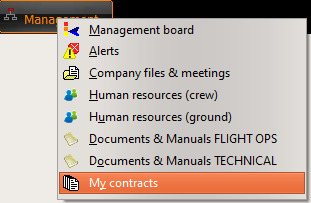
ii/ Select "Management / My Contracts":
iii/ To record your first contract, click on the "New Contract" button:
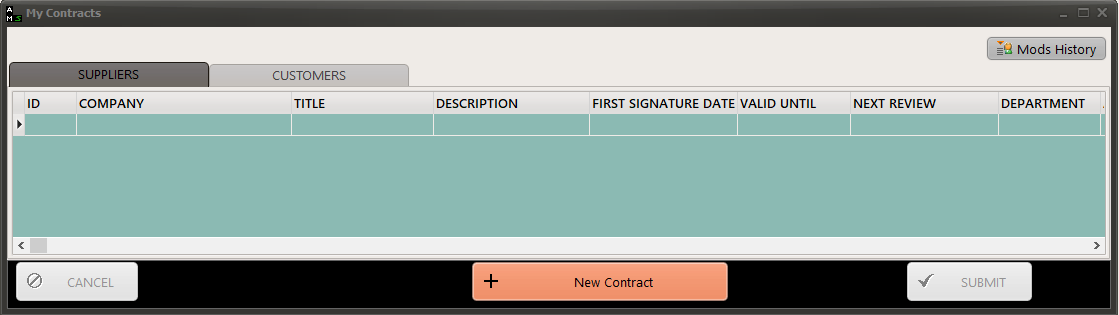
and enter all data as per this example:
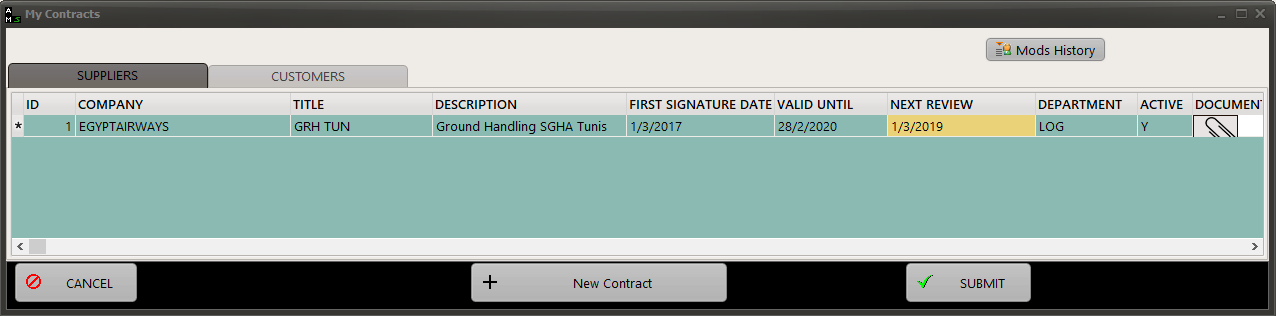
Note 1: As a minimum, you must enter the VALID UNTIL field or the NEXT REVIEW date. It is recommended to enter both dates. The system will send you email notifications when the VALID UNTIL date or the NEXT REVIEW date is approaching ( these notifications will be sent 30 days prior expiry, then 7 days and a last notification on the entered date)
Note 2: The DOCUMENT field is used to record the electronic copy of the contract, as well as the minutes of past contractual reviews.
iv/ Press the SUBMIT button to record your contract
Email notifications:
Process owners are notified by email when a contract renewal or a contract review is approaching. Notification periods and frequencies are exposed in the article Notification, Alerts and Messaging service