The Documents & Manuals module is your repository for all controlled documents, including internals or externals, manuals or publications, letters, memo...
Each designated user manages his/her documents on behalf of a department, and can share (or not) these documents across the entire company. Digital documents can be loaded in this repository or a link to an external source can be recorded (for digital manuals for example) together with user notes explaining how to read or install the manual.
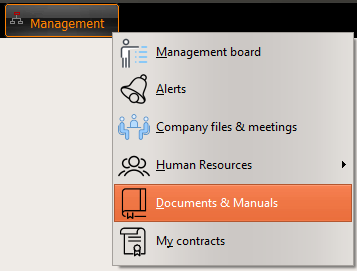
Open the Documentation & Manuals module from the Management tab:
Note: User rights need to be initialized before accessing this module (refer to User rights and to the following article)
User Rights

DOC / Create documentation or revision
Checked: the user is authorized to create new documents (or to receive new revisions of an existing document)
Unchecked otherwise.
DOC / Create new site
Checked: the user is authorized to create a new documentation site (a place where the documentation is stored)
Unchecked otherwise.
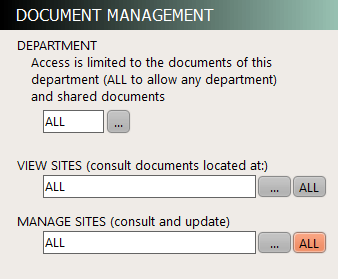
DOCUMENTS / DEPARTMENT
This field identifies the department this user belong to, for the purpose of documentation. When a department is identified, the user can only view the documents of this department , or the document being shared by the other departments. "ALL" is used to authorize any department (reserved to users in charge of managing the documentation on behalf of all departments)
Warning: if this field is left blank, the concerned user will not be authorized to view any documents.
DOCUMENTS / VIEW SITES
This is the list of sites the concerned user is authorized to view (read) the documentation of.
You need to create a site before this site can be selected here.
DOCUMENTS / MANAGE SITES
This is the list of sites the concerned user is managing (can modify documents). Several users may have the privilege to manage the same site.
You need to create a site before this site can be selected here.
Note: Both fields DOCUMENTS / VIEW SITES and DOCUMENTS / MANAGE SITES are updated automatically when a user creates a site (with the DOC / Create new site privilege). The user who creates a new site inherits the reading and writing access on this site.
GENERAL PRESENTATION

This first tab "Central Management" is used to manage all documents across the company (eventually limited by the Department identified in User Rights) and on any sites (eventually limited by the sites defined in User Rights). This tab gives access to the following functions:
1/ List all sites / Create a new site / Modify existing sites
2/ Consult any document / Create a new document / Modify documents and record Revisions and Temporary Revisions / Distribute documents to a list of sites
3/ View the list of "to do items" in order to maintain the documentation registry and verify that all documents are up to date
4/ View the list of document distributions still waiting to be received by the recipients

This tab is used to manage your documents as documentation site manager. From this tab, you can:
1/ Consult any document available on your site
2/ Acknowledge the receipt of new documents and document revisions

This third tab is used to browse documents and read it as a documentation reader. From this tab, you can:
- Search documents and read it