For parts having high historical consumption, as well as parts having a high dispatch impact compared to their value, setting a minimum quantity on shelf is an easy and predictable way to ensure that you will never fall short.
Consider also implementing a periodic review of these minimum quantities to ensure these quantities matches your current and planned operations
Note: Refer to the section Inventory Analysis to analyze your inventory and identify potential shortages
Refer also to the Nomenclature module regarding the general use of this module.
Once these quantities are defined, AMS will compare the quantities available in stock and:
- Send alert messages whenever the quantity available is bellow the specified minimum quantity
- Raise the Provisioning Requests (PR) for stock replenishment
To record a minimum quantity, select the appropriate P/N in the Nomenclature module and display the STOCK POSITION tab as per the bellow screen shot:
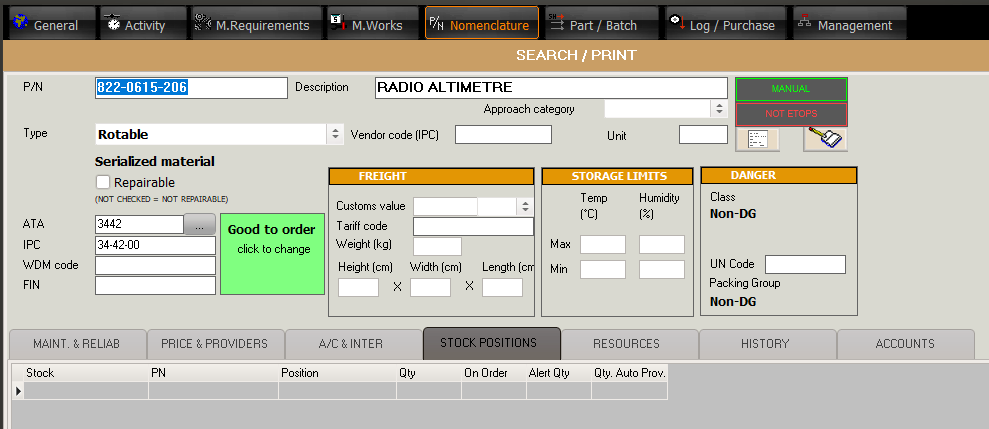
Enter the fields:
Stock |
The stock you want to define a minimum quantity for |
Position |
The BIN Location where this P/N is located for the above stock |
Alert Qty |
The minimum quantity |
Qty. Auto Prov |
The quantity to be reordered |

To raise the PR for Stock Replenishment:
- Select a stock in the search page of the Nomenclature Module, tick the box "In alert" and press the "Search" button

- From the "Utilities" option (at the bottom of the list), select "Generate PRs for positions in alert"
AMS will create the PRs in the PR module (without validating). Review the PR before validating.
Note: You may notice the list of "positions in alert" from the Nomenclature module is not the same as the PRs generated in the PR module. This is because the Nomenclature module is showing all positions currently in alert whereas only the PR necessary to rectify this situation are generated. If you validate the PR and run this utility again, AMS will not generate any PR because they already exists.