The MOD sub module is an assistant to quickly consult / modify / report the aircraft standards
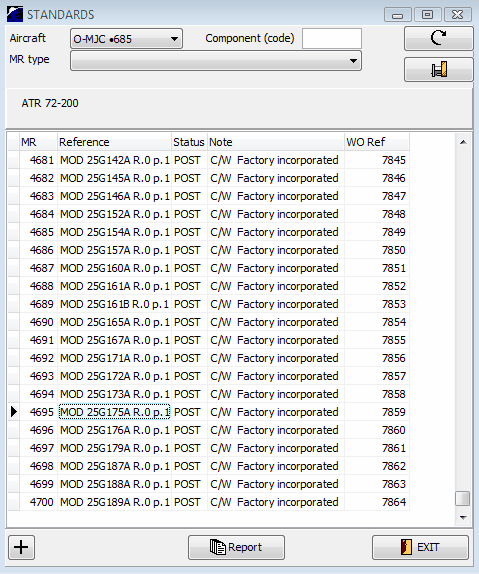
To start working with this module, specify the aircraft registration or the component you would like to work with and press the "search" button.
The list of modifications applicable to this aircraft or component are displayed. A particular MR type can also be selected (optional) in the top selection filter.
All data displayed by this sub-module are the same than in the MR module. Modifying the data with the MOD sub-module will also change the data in the MR module (this is an assistant dedicated to the standards management)
A right click on a modification opens the following links:
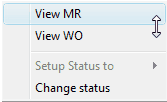
- View MR: display the concerned MR (Maintenance Requirement)
- View WO: display the concern WO (Work Order)
- Setup status to: Set the initial status (only available when the status in not set)
- Change status: display a recall message "to change a status, select View MR and change the concerned status"
To record a new modification (standard) for the selected aircraft / component displayed in the top selection filter,
- click on the "+" button:
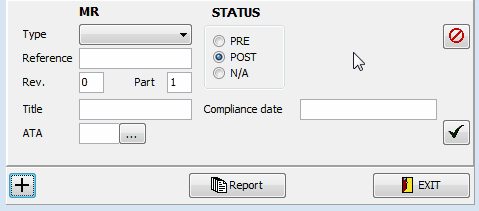
- fill all fields as required (MR type / Reference / Rev./ Part / Title / ATA / Status (PRE / POST / N/A) and compliance date (if status is POST))
- click the "validate" button.
Note 1: if the modification was factory incorporated, specify "01/01/1800" as the date of compliance.
Note 2: if the specified MR already exists (same reference, part, rev) you will be asked to confirm the equivalence or to cancel your changes
Note 3: (Recall) the MRs created using the MOD sub-module are also visible in the MR module.
Report: preview / print the report for the selected modifications.