The Kardex sub-module displays the component's positions of an aircraft with the details of the components installed.
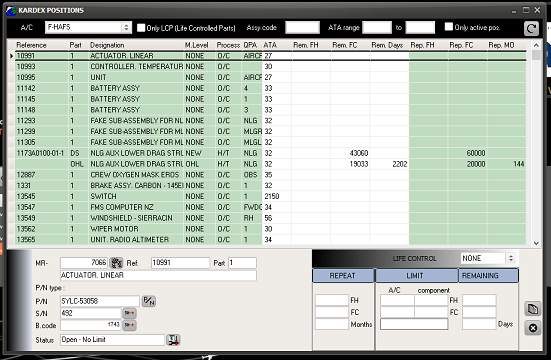
As soon as an aircraft is selected, the installed component positions of that aircraft are displayed and the top band can be used to refine the search:
Each row has a different color to highlight special situations:
- Green: normal situation
- Red: The position concerns a life controlled component and no component is installed or the component installed is overdue.
- Yellow: There is no component installed to this position but the position is not life controlled
- Purple: The position is not applicable to this particular aircraft (the reason is displayed in the details area)
Select a position (left click) to display the details on the bottom area of the window
- MR (Maintenance Requirement) related to that position: click on the button to display the MR
- P/N, S/N, code of the installed component (click on the P/N , S/N button to display the concerned data)
- Status (click on the button to display the associated WO)
Report (bottom right button)
Use this report to preview / print the fitted equipment list (as selected) with a maximum of details (component's data at installation, certification documents, remaining potentials, etc)