AMS is delivered with over 200 standard reports.
Some of these reports can be modified or even completely replaced by the end user, and some others can only be modified by our support department (which might be chargeable depending on your license agreement)
How do I know if a report can be freely modified ?
Take note of the report reference which is displayed at the bottom
Browse to your AMS installation directory an into the /reports/ folder (by default: C:\AMS\AMS_Client\Reports\). All the reports located in this directory can be freely modified by the end user. If you see one file having the same name as your report reference then it is modifiable.
How to modify a report ?
- Log into AMS using an ADMIN account
- Go to the module producing this report and run the report as if you want to display it
- On the "Reporting Parameters" window, tick "Report Designer" and press "Continue":
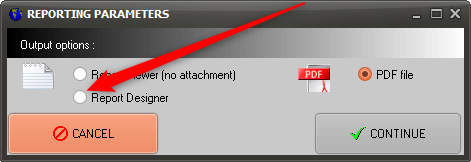
The above option will only be displayed if you are logged as an administrator and the report is modifiable (this is another way or knowing if a report is modifiable or not). A similar check box is displayed on the Work-Package reporting window to modify one of the WP report, provided this report is modifiable.
The User Manual of the report designer is available by pressing "F1" or selecting the Main menu / Help / Help content directly from the report designer.
IMPORTANT: If you modify a report, do not record your changes using the original file name (if you use the same file name AMS will overwrite your changes during the next upgrade). Instead, save the modified report to the name locations but adding the 3 letters "SPC" at the end of the file name (prior to the file extension). Example: the standard report R_WP_CRS.fr3 (which is the CRS of a Work-Package) and its specific version R_WP_CRSSPC.fr3.
The same principle will also apply when you order a change to a non-modifiable report: We will deliver a file having the same name of an existing file but having this "SPC" suffix.
IMPORTANT: When a customized report is used, this report will need to be maintained by your company. AMS releases will include upgrades of the standard reports but these upgrades will not be reflected in your customized reports.
IMPORTANT: If you are using specific reports (or templates), you can deploy these files on all client computers by installing these files on the server. Refer to the Installation Manual section 3.2.4.