In addition to the general record ownership rules, as defined in the section Multi Companies (optional feature of AMS), Work Orders can be approved and reviewed by companies and individuals having special permissions:
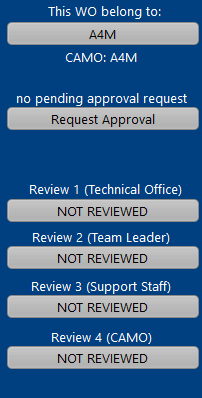
WO APPROVAL
In a standard environment (single company), WOs are created by the maintenance planning department (or equivalent department) of the operator, or by the production planning (or equivalent department) or the repair organization (MRO). In each case, the user has full control over the created WOs, as the record owner (in the case of a MRO the record will ultimately belong to the operator but the MRO has full control over it until the records are handed over to the operator).
Even when AMS is used in single company mode, the user can request approval of any WO. When an approval has been requested, only these users having the right "approve WOs" can approve.
Requesting approval is done by clicking on this button:
Once an approval has been requested, the above section is displayed as shown and only these users having the right "approve WOs" can approve:
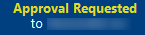
Click on the APPROVE button to approve the WO. This button will only be available if you are logged as the company identified as CAMO for this aircraft.
a special filter is provided to browse WOs pending for approval

Approving a WO does not prevent it from being modified. The purpose of WO approval is to show when a WO has been approved by a person having authority to approve it. When an approved WO is modified (next due, requested work, critical, tolerances fields), the approval is canceled and a new approval can be requested. The history of approval requests and approvals is available at any time by clicking on the "Mod by.." button
Additional features accessible only when using AMS in multi-companies mode:
As exposed in the section Multi Companies, a WO is owned by the company creating it. The owner company can do any changes to the WO (provided the logged user has the necessary user rights) and the printed WO clearly shows the owner company logo and address, which is the company under which the WO is issued.
When a WO is created by a MRO, the MRO must request approval of the CAMO to be able to print the WO on behalf of the CAMO (showing the CAMO logo and address). When a company approves a WO, this company becomes the owner of the WO and, consequently, the logo and address of this company are displayed on the WO.
WO REVIEWS
Up to 4 reviews can be activated to manage WO endorsements during its life cycle. These reviews are defined in your General Settings (Maintenance / Maintenance requirements / WO)
The names of these reviews are customizable but their fundamental meaning is the following:
Review 1: Validation of the WO preparation (by the CAMO / Repair shop / MRO) prior to production
Review 2: Acceptance of the work by the person representing the repair organization (eg. Team leader)
Review 3: Validation of the work and availability of all necessary resources
Review 4: Post production validation
Each review is governed by a specific user right "Review 1" to "Review 4"