|
INTERFACE |
DESCRIPTION |
|---|---|---|
1 |
|
•Left / Right buttons : Recall the previous (left arrow)/ next (right arrow) search •List button : Print a report (click on the down arrow to select the report, as described hereafter). |
2 |
|
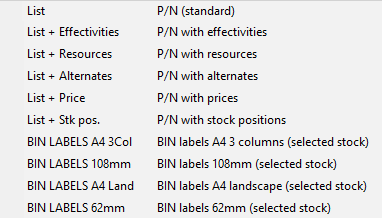
List of reports: ✓"List : This is the standard list. Equipment or services are listed with the following information : part number, description, type, ATA number, measure unit, essential code, replacement mode, vendor number, if the equipment is ETOPS or not, approach category and if the P/N has been automatically generated or not. ✓"List + effectivities" : This list contains the standard list information plus the aircraft type, number of component per aircraft, IPC reference. ✓"List + resources" : This list contains the standard list information plus: quantity in stock and on order for each stock. ✓"List + Alternates" : This list contains the standard list information plus the alternate P/Ns. ✓"List + Price" : This list contains the standard list information plus prices. ✓"List + Stk pos.": This list contains the standard list information plus the stock BIN location, quantity in stock and on order, alert quantity, auto provisioning quantity.
|
3 |
|
•Clear : Clear the search fields before starting a new search •Search : Execute the search command and display the results
|
4 |
|
Detail : displays the details of the P/N currently selected in the list Refresh : updates the information information displayed (request the server to send new data in case another user modified the list you are displaying) Add : Create a new P/N Utilities : Generates the provisioning requests for stock replenishment
|