In the Activity Module, display the Cabin Condition:

1. In order to create a Cabin Defect, right-click anywhere on the grid to display the contextual menu
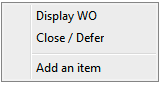
2. Click "Add an item" (Quick Snag)
•Enter the Cabin defect
•Select the "Cabin Defect" as type of defect,
•Select the ATA chapter from the list
A dialog box will pop-up in case a mandatory field was not entered.
Deferral
If the defect was not rectified, defer the defect as specified by the engineer on the Cabin / Technical Log (in accordance with your company policy & procedures)
Enter the deferral limits and then click on the "Apply" button;
If you double-click on the newly created snag, you will be directed to the "Maintenance Work" Module and the associated WO will be displayed.