This module regroups all information related to the list of aircraft (the fleet list) and their activities
It is composed of 2 principal tabs (on the left side of the screen): Fleet and Aircraft.
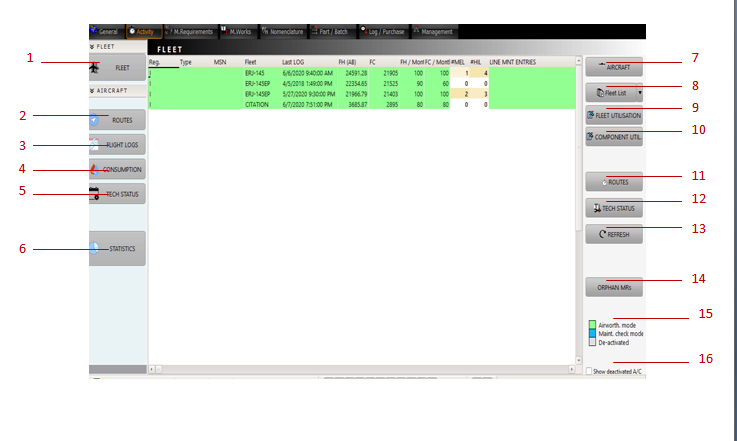
This screen is the central list of aircrafts (displaying: registration, type, serial number, associated fleet name if any, latest hours and cycles and mean utilization ratios)
1: FLEET
This screen contains the list of known aircraft (the fleet list for airlines and the list of customer's aircraft for MRO's)
Consult the next articles for details about this particular screen (items 7 to 16)
Double click on an aircraft to displays its trip records/routes.
2: ROUTES
This screen displays all information about a particular aircraft's routes, commercial information, technical log book, cabin log book, fluid consumptions.
You can access the information by double clicking on a particular aircraft on this screen, or click on the ROUTES button (ref. 11).
This screen is also detailed into the next articles.
3: FLIGHT LOGS
All information about a particular aircraft's routes, commercial information, technical log book, cabin log book, fluid consumptions.
4: CONSUMPTIONS
Calculates the engine oil, APU, hydraulic and fuel consumption of an aircraft during a selected period.
5: TECH STATUS / OPERATIONAL SITUATION REPORT
This screen displays the operational situation of a selected aircraft (commercial and technical information as used by the flight operation department).
This screen is detailed into the next articles
6: STATISTICS
Gives access to a wide range of statistics reports (Operational reliability, Gaz emission report, commercial report, etc).
This screen is detailed into the next articles
7: AIRCRAFT
Displays the aircraft data sheet (refer to the next article Fleet List)
8: Reports
This button gives access to the reports related to the aircraft list and the aircraft operations (fleet list, monthly activity reports)
9: Fleet Utilization Excel
Provides an excel report of fleet utilization in a chosen period.
10: Component Utilization Excel
Provides an excel report of a component/part no. utilization in a chosen period.
11: Routes
This button opens the Routes screen for the selected aircraft. It is equivalent to click this button and to double click on the aircraft in the aircraft list
12: TECH STATUS
This button opens the Operational situation screen for the selected aircraft
13: Refresh
Refresh button: see the General interface chapter, Data processing article.
14: Orphan MRs
This button displays the Maintenance Requirements (MR) effective to the selected aircraft which status are undetermined (not set)
15: Legend
Green: aircraft in airworthiness mode (the airworthiness condition of the aircraft is manager with AMS)
Blue: aircraft in maintenance visit mode (the aircraft is identified for the purpose of maintenance visits only, its continuing airworthiness is controlled by another organization)
Gray: aircraft deactivated
16: (checkbox): tick to show deactivated aircraft. When unchecked, only active aircraft is displayed in the fleet list.