|
|
|---|---|
1 |
In this example, we will record a decision to process a PR by raising an RFQ. The same principle applies to the commitment of any document to any other document, provided the committed document is a valid decision option Committing to a document is an optional procedure (you can directly generate the RFQ without committing to it first) and is used to make the decision to proceed with an RFQ without generating the RFQ. This is useful when the decision to raise an RFQ is not made by the same department as the one actually raising the RFQ.
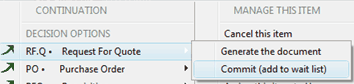
Right click on a PR row item to open the contextual menu. Browse to "RF.Q" and select "Commit"
Example : Request for Quote is committed below:
|
2 |
If you (or any other user) check the decision options of this PR, the RFQ will now show as committed. The department in charge of processing RFQ can now raise it (by selecting the "Generate the document" menu.
|