•It is not necessary to close each WO of a WP before closing the WP. Closing the WP will automatically close all open WOs (except those related to component with a Maintenance Level as these WOs require a component removal / installation TAG).
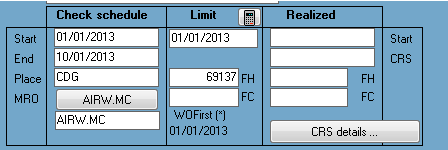
1.Select the WP from your WP list 2. 3.Fill the fields under "Realized" section (CRS date, FH & FC) 4.Press the "Validate" button
Note: You can add the CRS tracking number and other data by pressing the "CRS details" button. |
Heavy Maintenance Packages:
After heavy maintenance, the AMP may allow the "Next Due" of each task to be calculated from the date of CRS, disregarding if the task was overdue when completed. For example, if a "A check" was carried out 1 month late because the aircraft was undergoing a major C check, the "Next Due" for the A check might be calculated from the CRS
After closing the WP, select the appropriate option ("CRS Details" bottom section):

Update Next Due / From date of CRS / All WOs:
AMS will use the date of CRS to update the Next Due (disregarding any late completion or tolerance used) for all WOs included in this WP, to the exception of WOs related to component having a Maintenance Level <> None (The Next Due of these WOs is base on the installed component data)
Update Next Due / From date of CRS / Only WOs closed automatically:
Do the same as the previous option but only for WOs closed automatically (when you closed the WP).
Note: When WOs are closed automatically as a WP is closed, the "Task Performed" field is set to "[•] Complied With ....". The 3 first characters [•] are used to identify the "automatically closed" WOs. You can remove these characters if you want to exclude a WO from this Next Due re-computation.
Update Next Due / From each WO performance date:
AMS will use each WO compliance date to update the Next Due (disregarding any late completion or tolerance used) for all WOs included in this WP, to the exception of WOs related to component having a Maintenance Level <> None (The Next Due of these WOs is base on the installed component data)