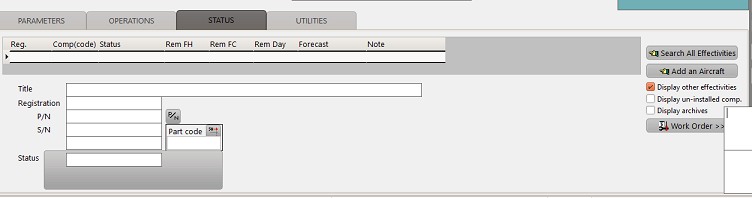
The status tab gives a direct access to all status associated with the selected MR. The status are listed in the upper grid and the details related to the selected row (last performed / next due / remaining) are displayed in the lower area.
A double click on a status opens the M.Work module and displays the concerned WO
Commands (right side of the area):
- Search all Effectivities: This function searches based on all the effectivities and displays the corresponding status.
- Display other effectivities : If an effectivity was set in the selection filter, un-checking this box will hide the status that don't match the filter. If checked, all status are displayed. Note: this box must be checked to enable the "Search new effectivities" function.
- Display un-installed comp.: If checked, the uninstalled components are displayed in the list (hidden otherwise)
- Work Order: Display the last work order for the selected status (is equivalent to a double click on the status)