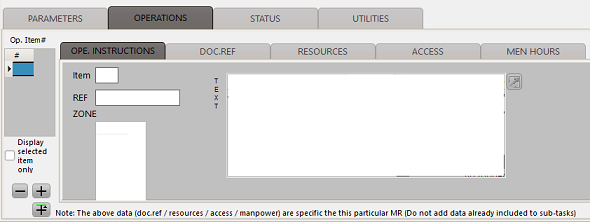
This tab is dedicated to the accomplishment instructions. Information entered in this section will be printed as operations in the associated work cards.
The list "Op.Item#", on the left, is the list of the different "Operation item numbers". The check box "Display selected item only", located at the bottom of this list, control how the information are displayed:
- unchecked (default): All items are always displayed in the different lists (DOC.REF / RESOURCES / ACCESS / MEN HOURS). The item selected in the "Op.Item#" list is highlighted in the other lists.
- checked: Only the operation selected in the "Op.Item#" list is displayed in the other lists.
An operation is defined as a maintenance action which is part of a sequence of actions.
Operation header information
- Item: the operation number
- Zone: list of zones where the maintenance operation is accomplished
- Text: Accomplishment instructions of the operation
- Ref: Reference of the operation (if any)
DOC.REF
This tab specify the document referenced by this operation. For details about the document of reference, see also Reversing the MRs by doc.Ref.".
- #: the operation number
- Upt: revision mark (NEW / REV / DEL)
- Doc.Reference: The document of reference
- Rev.: Revision number of the document of reference
- Issued by : Document issued by.
- Note: Comments
RESOURCES
This tab contains the list of ressources required for the accomplishment of the operation
- #: the operation number
- P/N: Part Number
- Description: Description of the part number
- Qty: Required quantity
- Condition: Minimal condition of the material (NEW / OHL / INS / SVC)
- Transaction: Requested transaction for the purchase of the material (Purchase, Requisition, Loan, Exchange, Repair)
- Incl.PR: Systematically include this material in the Provisioning Request
- Price (info): Catalog price of the material (for the requested transaction)
- Currency: Currency used to define the price
ACCESS
This tab defines the access to be open for the accomplishment of all operations
- A/C type: Concerned aircraft type (filled automatically if the MR is effective to an aircraft type or a protocol)
- Access code: Code of the access
- Name: Name of the access (Set automatically if this access code is already defined)
- Special condition: Any special condition pertinent to the access opening / closing
- Required MEC #: Number or required mechanic(s) (Set automatically if this access code is already defined)
- M/H per MEC: Men hours required per mechanic (Set automatically if this access code is already defined)
Note there is no indication about the operation number. This is because the access are opened at the beginning of the visit (before any operation has been accomplished) and closed after all operations have been accomplished (Each required access is opened one time only, not opened and closed after each work card if several work cards need the same access to be open)
MEN HOURS
This tab is used to defined the manpower required to accomplish the operation
- #: the operation number
- Spc: required speciality as defined in the general settings
- # Men: number of required men (of the selected speciality)
- M/H(/man): number of men hours (per mechanic)
- Total: total number of men hours (auto calculated)
- Manuf.# Men: number of required men (of the selected speciality) as per the manufacturer
- Manuf M/H (/man): number of men hours (per mechanic) as per the manufacturer