Implementing a MR to a fleet requires each status (the state of implementation of this MR to each effective aircraft) to be assessed.
The MR assessment and each status assessment is recorded in the Assessment tab:
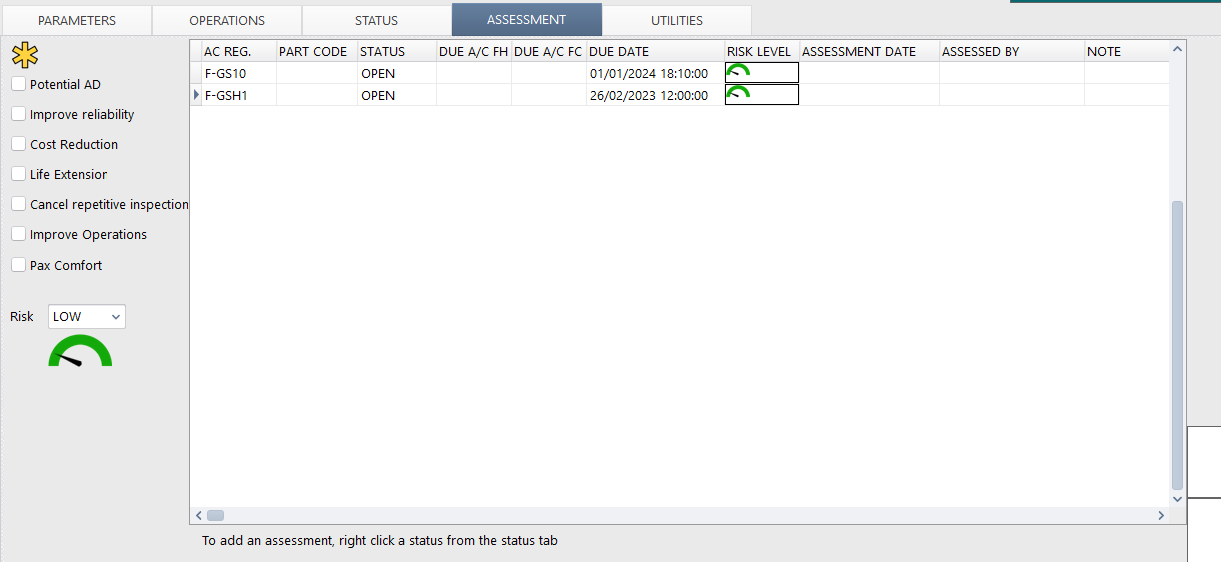
This assessment functionality is available for all MR (not only for optional MR like SB)
MR assessment
The left section relates to the MR assessment. It contains the potential impact of this MR in term of regulatory compliance, reliability, service quality and so on. The Risk level displayed in this section is the minimum risk level associated with the decision to implement the MR.
Adding a new assessment:
When a MR is modified or is newly introduced using an amendment ( Using Amendments ) an assessment request is automatically generated by AMS for each status displayed in the STATUS tab. These assessment requests are generated when the ASSESSMENT tab is open, which means that you can avoid generating an assessment request by not opening the ASSESSMENT tab.
When a MR is already fully effective (not an amendment) and the status of an aircraft need to be assessed, go to the STATUS tab, right click on the concerned aircraft status and select "mark for assessment" to create an assessment request.
Note: When a status is subject to an assessment, it is marked with an asterisk in the STATUS tab

Status assessment fields:
DUES AC FH / DUE AC FC / DUE DATE can be changed on the underlying WO (right click / change status)
The risk level relates to the decision to implement this task on this specific aircraft (this risk level can be higher than the MR risk Level but not lower)
The ASSESSMENT DATE and ASSESSED BY are filled by selecting "Approve this assessment"
The NOTE field can be used to record any comment related to the assessment
The WO field is the reference of the WO supporting the next due limits
Note: Once an assessment has been approved, it cannot be modified. An approved assessment can only be deleted by a user having administrator privilege
Review pending assessments:
A selection filter "with pending assessment" is available in the MR selection page to list all MR having at least one pending assessment