The Airport sub-module is used to display airport information. It can be used directly from the Activity module to display extended information about arrival and departure points.
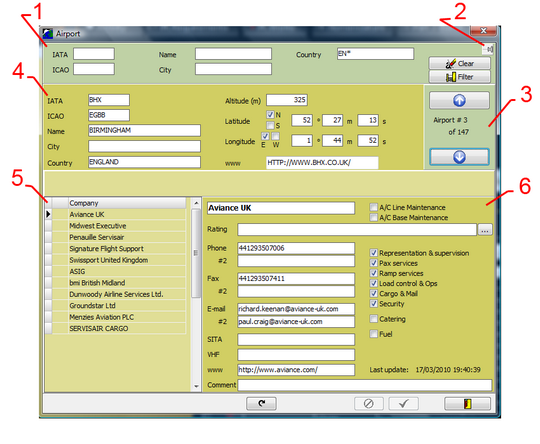
1/ Selection filter (see also the filtering strings article when filling the criteria - all search fields are strings):
- IATA: IATA code of the airport
- ICAO: ICAO code of the airport
- Name: Name of the field
- City: Nearest city
- Country: country
2/ Pin / unpin: when pined, the window will not disappear if a mouse click is made outside of the window area (the window disappears if unpinned).
3/ Displays the number of airports currently selected (matching the search filter) and the navigation buttons
4/ Airport data of the selected airport:
- IATA / ICAO / Name / City / Country: definitions as per the above selection filters
- Altitude, longitude, latitude, web site
5/ List of providers for the selected airport
Left click on a particular provider to select it and display its details in section 6 below
6/ Provider's details:
- Name, Phone, fax, email, SITA, VHF, web site, comments
- Provided services (Aircraft maintenance - line / base , Representation & supervision, Pax, Ramp, Load control & ops, Cargo & Mail, Security, Catering, fuel)
- The ratings associated with aircraft maintenance is displayed in the "rating" field and can be modified by clicking on the contextual "..." button