Logistics modules may require to be cleaned up, especially when all the functions and sub-modules are not used (which is the case when iCare AMS is first implemented and new functions and modules start to be used several years later). For example, if PR (Provisioning Requests) are generated by the Planning Department but the Purchase department was not processing the PRs for several months, you may end up with several thousands of open PR, which in-turn makes it difficult to monitor which PR are really open and which was not processed in AMS but might be no longer required.
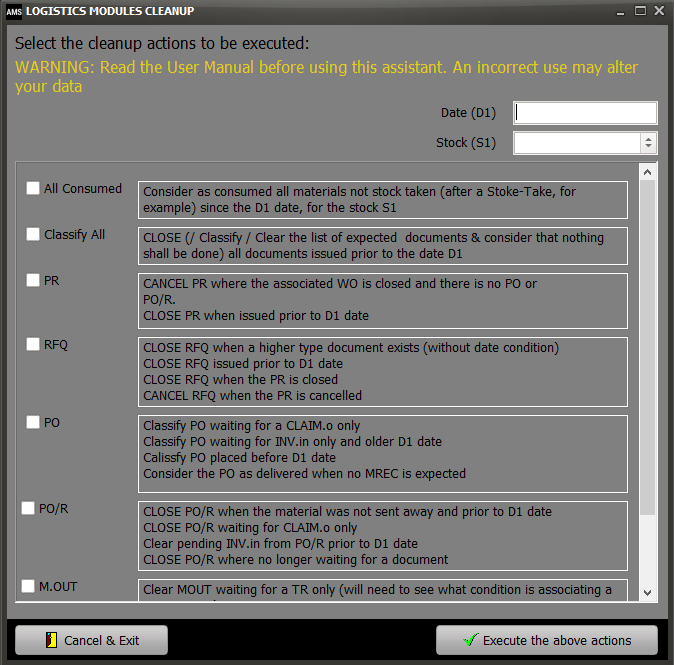
To facilitate this necessary cleanup, iCare AMS implements a "LOG MODULES CLEANUP" function which is available on the "ALL" sub-module:

WARNING: This function will directly modify the current status of your logistics documents and changes cannot be undone. This functionality requires the "Logistics / Manager" privilege (refer to Security / Users )
If you have any doubt regarding this functionality or if you are not familiar with it, ensure that your database has been backed-up and can be restored in case of misuse.
Read carefully the definition of each cleanup actions as displayed on screen. Once you are confident that this is what you want to do, check the desired action (on the left side) and ensure the variables called out by this action are being provided on the top of this window (Date D1 and Stock S1 as applicable to the selected action)
For the avoidance of doubt, variables are necessary only when such variable is referenced in the action description. When no variable is referred to in the action description, this mean that the action will be performed without considering a variable
For example, the action "Classify PO waiting for a CLAIM.o only" does not refer to a variable. This means that all PO (without considering the date of the PO) waiting for a CLAIM.o only will be classified.
Other example: the action "Classify PO waiting for INV.in only and older than D1 date" refers to the variable "D1". D1 must be entered and failure do so will raise an error message.