|
DISPLAY |
DESCRIPTION |
|---|---|---|
1 |
|
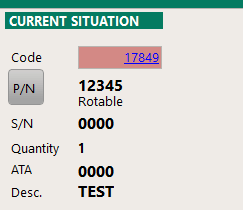
Code Material code (assigned by iCare AMS)
P/N is the part number *
S/N is the serial number or Batch number (as applicable to this P/N)
Quantity : Quantity
ATA: ATA
Description Name of the material * To display the nomenclature details click on : or right click anywhere on the window.
|
2 |
|
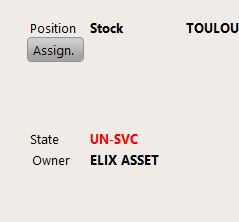
Position Current location
Assign : Material Assignation information (validity date / aircraft / WP / WO) *
State: Current state of this material (quarantine : a problem was identified on this material and it is isolated from the other materials until a resolution is found or the material is scrapped; unserviceable : the material is not serviceable (U/S); serviceable: the material is serviceable)
Owner: Company owner of this material
Click on
* Click on
|
3 |
|
This reference is complementary to the Position field |
4 |
|
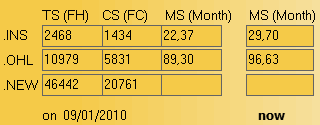
This table summarize the component life:
Columns : •TS (FH) : Time since (in flight hours) •CS (FC) : Cycles since (in flight cycles) •MS(Month) : Month since (in month)
Lines : •INS : Inspection or Repair •OHL : Overhaul •NEW : New
|
5 |
Actions
|
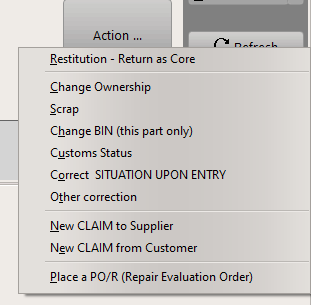
This button gives access to contextual actions:
These functions are detailed in the Actions article |

 to
to  to change the assignation information(