MRs can be associated into blocs using parent / children links (high level / lower level inspections)
These links are set using the "Parent MR" field (Upper/Sub Tasks) displayed on the header of each MR:
When a MR has a "Parent MR" field value set, that means it is included into an higher MR bloc. The main consequences of an MR being included into an higher bloc are:
- if the higher bloc is added to a work package, the lower MRs (children) are also added to the work package,
- the lower MRs (children) should be set as PACKAGED, meaning that, by default, they are not displayed in the M.Work schedule (only the higher MR (parent) should be set as NOT PKD and is displayed in M.Work module when "Airworthy items only" is checked)
The contextual button of the "Parent MR" field opens the "MR Tree View", displaying the hierarchical view or MRs:
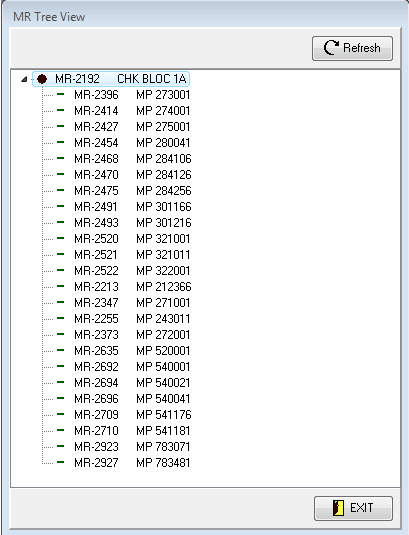
Note: a double click on the list displays the concerned MR
When designing a Maintenance Program, it is important to define which MRs are phased to other MRs. It seams obvious (and it is) to define that all A4 work cards have their "Parent MR" (upper bloc) set to the A4 check bloc, but it is not so obvious when defining the links between the check blocs:
Example n°1: With an A maintenance cycle composed of 3 blocs (A1 - 100FH, A2 - 200FH, A4 - 400FH), there is a temptation to set the A4 bloc as the upper bloc (Parent MR) of the 2 others (A1 and A2) and the A2 bloc as the upper bloc of the A1 bloc, what may be absolutely correct with some Maintenance Programmes. This relationship means that it is defined, in the approved Maintenance Programme, that an A4 maintenance visit includes the A1 and A2 maintenance blocs; and that an A2 maintenance visit includes the A1 maintenance bloc (even if the lower bloc has more potential remaining than the upper bloc due to an anticipated compliance in the compliance history). In all cases, the implementation of the Maintenance Programme in AMS must match the approved Maintenance Programme.
Example n°2: The relationship between an A and a C maintenance cycle may define that any C maintenance visit includes all A blocs. In this case, the upper bloc of the A cycle (A4 with our previous example) must have its "Parent MR" property (upper bloc) set to the C1 bloc. If a work package is prepared for a C1 visit, the A4 bloc will be automatically included (and the A2 and A1 if defined as lower blocs of A4)
One MR can have an unlimited number of Child MRs (sub-tasks)
One MR can be a Child (sub-task) of any number or parent MRs
You can use the Utilities tab to check consistency of your MR blocs and verify that there is no circular reference