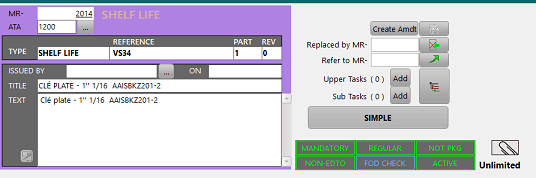
The color used to display this MR is the one defined for this MR type, in the general settings / M.Requirements
- MR: this is the internal identifier (ID) of the MR. This reference is generated by the system and cannot be modified. Note: when a MR is amended, it is replaced by another MR which has another ID.
- ATA: the concerned ATA chapter (press the "..." button to select it a detailed list)
- Type: the MR type as defined in the general settings
- Reference: Alpha numerical reference - default = 0
- Part: see "Multiple Part MR" - default = 1
- Rev: Revision number (alpha numerical)
- Title: Title of the MR (usually the main subject)
- Text: the text is a more detailed presentation of the MR (but not an accomplishment instruction). This field is the text printed on the status and the maintenance programmes.
- Create Amdt: this button is used to create an amendment of this MR (refer to "using amendments")
- Replaced by: identify the replacing MR (Id). The displayed MR is classified as "REPLACED" if this field is not blank.
- Parent MR (Upper/sub tasks) : identify the upper MR (Id). For more details, consult the "Hierarchy / maintenance blocks" article.
- Refer to MR: identify the MR which is binding this one. For more details, refer to the "Referring to another MR" article.
- Push button MANDATORY / OPTIONAL
- Push button REGULAR / EVENT DRIVEN
- Push button PACKAGED / NOT PKG
- Push button ETOPS / NON ETOPS
- Push button FOD CHECK/ NO FOD CHECK
- Push button ACTIVE / CANCELLATION