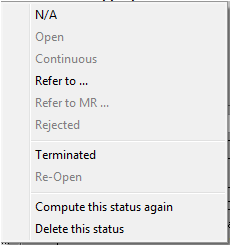
How to set the status (as displayed in the status tab of each MR):
New status
To add a new status in the list, click on the "Search All Effectivities" button:

AMS will search all new status by comparing the known aircraft and components with the effectivity of the concerned MR.
Note: to access this command, the checkbox "Display other effectivities" must be checked
All created status needs to be checked and modified if necessary using the following procedure.
Status modification
- Modify the limits: To modify the next due limits, double click on the status you would like to modify. This action displays the M.Work module on the WO (Work Order) associated with the status. Modify the limitations (FH, FC, date) to match the correct data (see also the M.Work module for details)
- Modify the status: To modify the status, select it and right click the status field

and select the appropriate new status: