To print a status, proceed as follows:
1/ If the status to be printed is a list of installed components (Kardex) for a specified aircraft, the Kardex sub-module can be used (optional) to obtain more details (Installed components dedicated report)
2/ In the M.Requirement module, define the MRs to be reported (MR selection) and, as necessary, the concerned aircraft or component in the selection filter. If
an aircraft or a component as been specified in the filter and you want the status of this aircraft or this component only to be printed, uncheck the box "display other appliances"

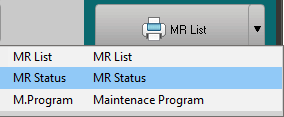
3/ Select "MR status" in the reporting options:
See also MR selection / Report
To report a single MR, refer to Reporting (single MR)