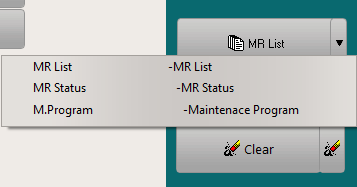
The reporting button is located on the right side of the MR search band. Click on the down arrow to list all available reports.
The three mains reports are:
- MR List: Print/Preview the list of MR based on search parameters. With no search parameters, the report will show first 5000 active MR records.
- MR status: Print/Preview the status of the selected MR for the selected effectivity
- M.Program: Print/Preview the selected maintenance programme.
Note 1: Each report in the above list has two different versions: one for the direct view by MR and the other for the view by reference document. The choice between these reports is made by selecting "by Ref / by Doc.Ref" as shown in the article: Reversing the MRs by doc.ref.
Note 2: All reports and each row items are automatically adapted to the MR and its status: The titles, fields and the general presentation of each row can change from a MR status to the following one to print the entire information with the most accurate and comprehensive view. For example, a MR which is effective to a component (installed or not on an aircraft) will display the concerned component's P/N, S/N and all known potentials as well as its installation data where applicable; a MR which is effective to an aircraft will display the last performance, the next due; etc.. This makes all reports independent from the kind of selected MRs (MR type) and several MR types can be reported on the same report.
To report a single MR, refer to Reporting (single MR)