The contact manager is a central management module for all companies (customers and suppliers) and their contact details:
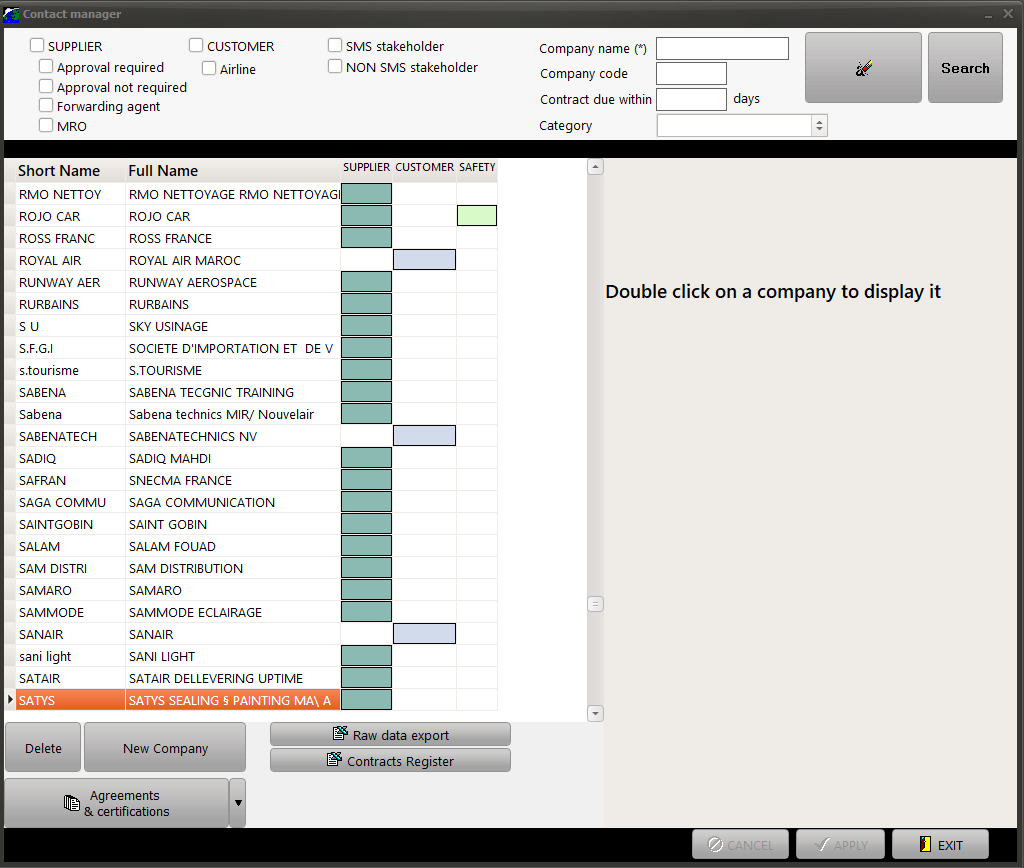
1/ Search filter (top band):
Enter any search criteria to find the companies your want to display / modify (Supplier / Customer / Airline / Forwarding agent / Company code / Name) and press the "Search" button
2/ List of matching companies (left section):
This section shows the list of companies matching your search.
Double click on a company to display its full details in section 3
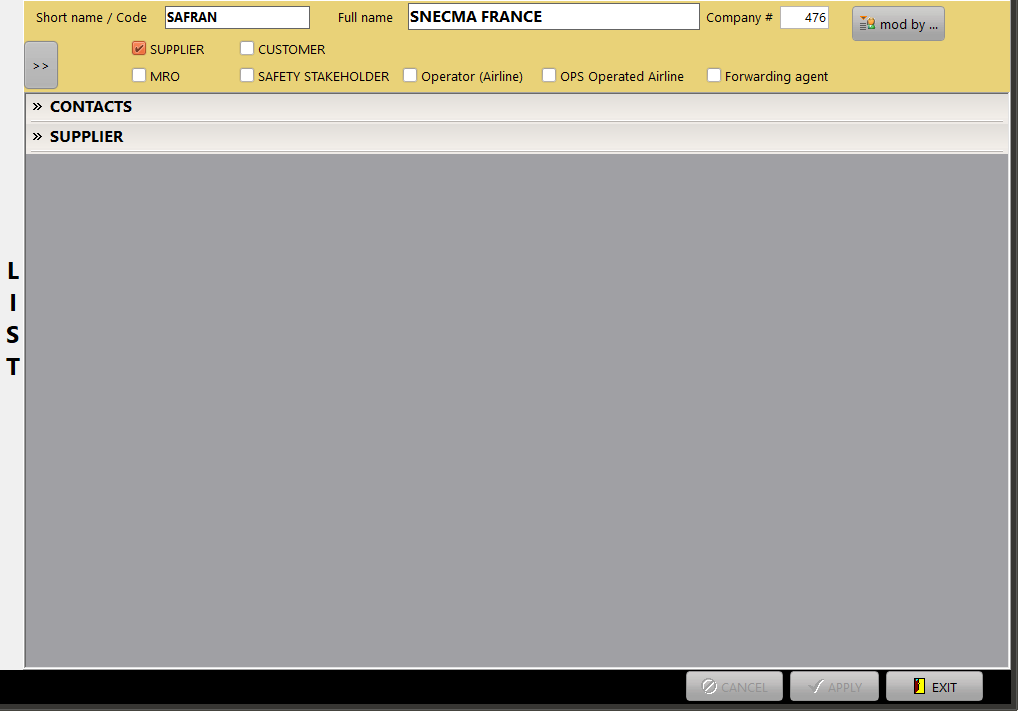
3/ Details of the selected company:
This section shows a list of panels based on the company header information (check boxes Supplier / Customer / MRO / Safety Stakeholder / Operator / Operated Airline / Forwarding agent).
Header information
- Short name / Code: Name of the company when displayed with 13 characters or less
- Official name: Full company name
- Company #: internal reference (identifier) of the company. This is an integer value assigned by AMS
- Supplier / Customer / MRO / Safety Stakeholder / Operator / Operated Airline / Forwarding agent: when a check box is ticked, the associated panel is displayed:
Contact tab (always displayed)
This section lists all contacts associated with the selected company. Special contacts (identified as default or specific contact) must include the full postal address
Select (left click) on a contact to display its full details:
- First name / Last name / Position
- Phn #1 / Phn #2 / Mobile / Fax / e-mail / web site / Address and identify if the contact is to be used for
- Cust. accountable dept.: this contact is the customer's accountable department
- Prov. accountable dept.: this contact is the supplier's accountable department
- Ship / Receiving dept.: this contact is used to send and receive shipments from/to this company
- Send RFQ to: the email address of this contact is used to send RFQs to this company
- Default: if there is no other contact for this company having one of the above attribute, this contact is used. Example: For a given company, if there is no contact with the "send RFQ to" attribute, the contact having the "default" attribute is used (if exists and if he has an email address)
- Accept HTML email forms: the contact can read HTML emails (emails sent as pure text messages otherwise)
Supplier tab (displayed when the box "Supplier" is ticked in the header section)
- Payment conditions: number of net days & textual information
- Ship via: if a special agent has to be used for deliveries
- Certificate: reference and expiry date of the internal approval (QA procedure). If "Accept only PO from valid providers" was checked in the general settings, this date will be checked before a P/O can be placed.
- Fuel supplier: check this box if this provider can be selected as "Fueling agent" on the TLBs
- Parts & Services families: This matrix identify the provider's profile by aircraft type and product families. Check the boxes matching the provider's profile. Note that the aircraft types displayed on this matrix are the one set in the general setting as "aircraft type in use"
- Parts & Services catalog: the price catalog of this provider can be placed in this section. When the price catalogs are implemented, the RFQ sub-module can search all catalogs to find the best offers.
| - Stations & rating: This section records all stations where the supplier is established (airports) and the associated |
| - Rating |
| - Provided services |
| - operational coordinates (SITA/ VHF / Tel / Fax / email) |
- Supplier Account tab
- Supplier Contracts: This section contains all contracts with this supplier. The field descriptions and general behavior are the same as Contract Management except that you can manage all contracts (belonging to any department) using this section.
Customer tab (displayed when the box "Customer" is ticked in the header section)
- General section: Contains general Customer data such as payment conditions, customer material markup, customer labour markup. When "OPS Customer" is ticked, this customer is also considered as a customer for flight operations (can be selected as the customer on TLB sequences)
- Customer Contracts: This section contains all contracts with this customer. The field descriptions and general behavior are the same as Contract Management except that you can manage all contracts (belonging to any department) using this section.
- Accounting: This section contains all customer accounting information
Forwarding agent tab (displayed when the box "Forwarding agent" is ticked in the header section)
- if a company is identified as a forwarding agent, it can be selected as forwarding agent on the AWB (Air Way Bills)
- the accounts to be used with this agent are specified using the "purchase account" (import) and "sale account" (export) fields
Safety & Approval tab (displayed when the box "Safety Stakeholder" is ticked in the header section)
- QA Approval: Tick this box if an internal approval is required / if this company supplies services or goods related to a NCAA requirements. Leave this box un-ticked if this company supplies general / stationary goods.
- Reference: Reference of your internal authorization for this company
- Valid until: Validity date for the above authorization
Note: by convention, the company code 0001 is reserved to the registered company of the database (AMS licensed customer)