The Human Resources module is used to:
- record personal files
- automatically update the logs of experience
- manage personal authorizations
- manage and keep updated the training schedules
It is divided into two sub-modules (Crew & Ground) working the same way.
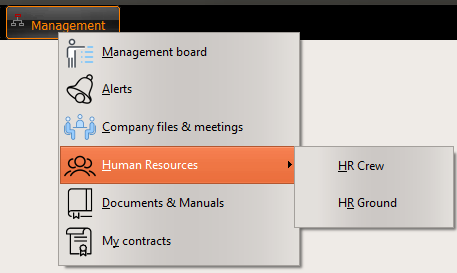
To start the module, select one of this two sub-modules:
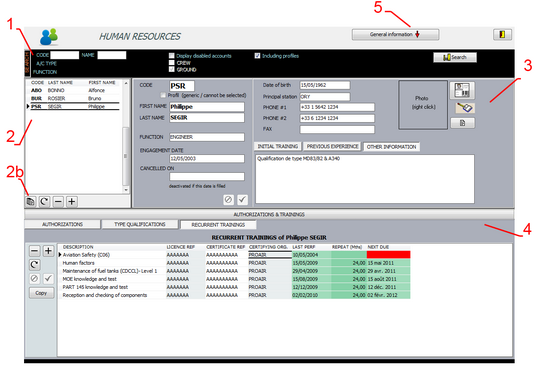
1- SELECTION FILTER
This selection filter is used to search employees:
- Code: the employee's code (see filtering strings)
- Name: First name (see filtering strings)
- A/C type: the authorized aircraft types (as defined in the general setting / aircraft types)
- Functions: the authorized function (the list of functions is preset for Crews / is defined in the general settings / engineer specialities for Ground)
- Display disabled accounts: Display disabled accounts if checked
- Crew: is checked (read only) if you are in the Crew sub-module
- Ground: is checked if you are in the Ground sub-module
- Including profiles: Profiles are displayed if checked (profiles are used as generic file to be easily copied to a physical employee)
2- LIST OF EMPLOYEES
This list contains all employees matching the search criteria. Click on a particular one to display his/her details in section 3.
2b- Commands
- Report: print personal file of the selected employee (Personal data / authorizations / qualifications / training / log of experience)
- Refresh: Request new data from the server
- Delete: Delete the selected employee
- Add: Add a new employee
3- EMPLOYEE'S DETAILS
This area regroups all details of the concerned employee including Initial Training / Previous experience and Other information (full text)
4- AUTHORIZATIONS AND TRAINING
This section is dedicated to the different authorizations granted to the employee by the company and the associated type qualifications and training.
The authorizations granted to an employee are also important for the use of the other modules:
- Only crews having the associated authorization (ex: B737-800 CAPT) can be selected in that position (CAPT on a B737-800)
- Only engineers having the associated authorization (ex: B737-800 B1) should be selected as an internal engineer signing a work order (B737-800 B1)
Each authorization should be associated a current certification and training.
If these associations does not exist, AMS will raise an alert (Alert module)
The last performance, repeat interval and next due dates specified in these 3 tabs (Authorizations, Type qualifications and Training) are used to maintain the training schedule (see the next article)
5- GLOBAL REPORTS AND FUNCTIONS
This button gives access to the following general functions (reports):
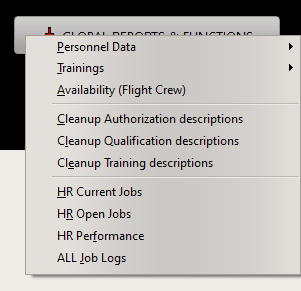
- Training:
- Training schedule
- Detect pending issues
- Authorizations without associated qualif/training
- No next due date
- Availability (CREW only)
Calculate, for each aircraft type and each crew position, the list of crew with their last flying hours on the last 7, 15 and 30 days; ordered from the best to the worst availability.