Search Parameters and fields explanation :
Ref: Logistics document (PO, RFQ, PR etc..) reference number. (Has to be integer value)
It is followed by the Item # of the document (in case of multiple item documents), if present (integer value only).
Y/Ref: Secondary reference (optional) to the logistic document if present, e.g. a third party document reference.

Case #: All documents from a logistic chain (for example a PR, then PO, then M.REC) are all linked together using a "Case #"
PN : Part Number
RQty: Required Quantity
Qty: Actual Quantity requested
UOM:Unit of Measure
Condition : Minimal condition of the required material
• NEW: ( Factory New or New Surplus)
• OHL: Overhauled
• INS/REP: Inspected/Repaired
• SVC: Serviced
• UNSVC : Unserviced
Further information of Condition valuation can be found in the Log/purchase / General
Deadline : Requested due date
Urgency : Select as per requirement
•AOG : Aircraft on ground
•CRITICAL
•URGENT
•ROUTINE
WO: Work order for which material is requested.
Note: Any added notes/comments
Excluded :
Transaction: Type of logistic function (Purchase/Incoming or Sale/Outgoing)
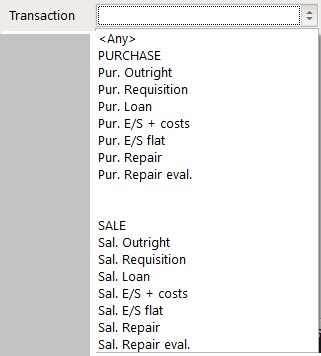
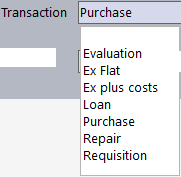
• Incoming transactions such as : Purchase outright, requisition, loan, exchange (Ex Flat, Ex plus cost), Repair, Evaluation.
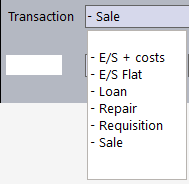
• Outgoing transactions are indicated by a ' - ' sign, such as : - Sale, - Requisition, - Loan, - Exchange (- E/S + costs , -E/S FLAT), -Repair
Note :
•Ex Flat or - E/S Flat : Flat Exchange rate : An exchange scheme in which the repair/overhaul costs are included at an average fair price.
•EX + costs or -E/S + costs : Exchange plus costs : In this scheme, you receive an SVC/OHL part in exchange for an UNSVC part. You are charged for the exchange plus the actual repair cost of the UNSVC part.
Other actions:
Correction: Modification of document details. Refer Actions of Part/Batch module for further details.
Assignment: Assign the logistic document to a customer/aircraft or WO. Refer Assignation window for more details.
Valuation: Refer Component Valuation for details.
Accounting: A logistic document can be searched by an accounting reference (General or Analytic).
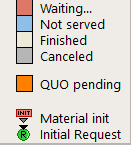
Color representation
Additionally,
The Green color for column "Qty" means that you have enough available (not assigned) material in stock to acquit this PR.
Red means that you do not have any,
Yellow means that you have some but not enough.
The Orange color for column "Ref." means this is a third party request.