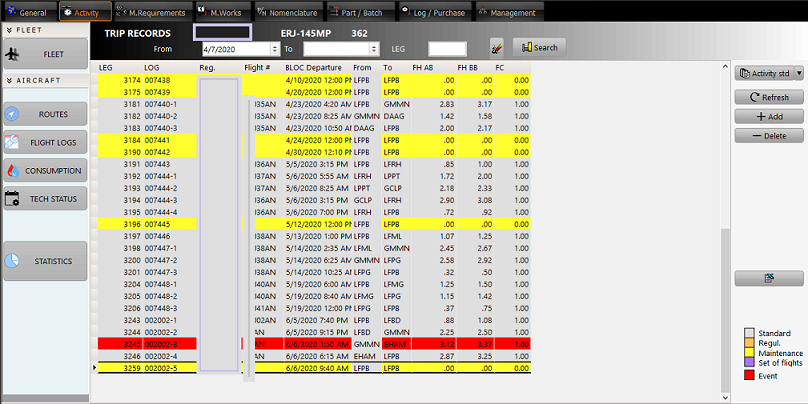
This screen is displayed when
- an aircraft was double clicked in the fleet list. Is this case, the aircraft registration is automatically filled in the filter and date range automatically select the last three months.
- the A/C ROUTES / ROUTES tabs has been selected. In this case, the filter is void and is waiting the user's entries or displays the last used filter when it exists
The right buttons (from top to bottom):
- Reports : Preview / print the reports related to the selected aircraft routes (Routes reports - extended & standard)
- Refresh : see data processing
- Add: Add a new leg immediately following the last one. Dee the recording the aircraft activity procedure
- Delete: Delete the selected leg. Note that, for data consistency reasons, only the last leg in the stack can be deleted. If an error was made on a leg that is already covered by other legs, a regularization leg shall be posted stating the error margins.
- Xls: Export the selected routes to Microsoft Excel.
Definition of fields:
- LEG: This is an internal unique identifier (integer value) of the LEG (a LEG being defined as a flight between two points). This value is automatically generated by the system.
- LOG: This is the reference of the LOG (or technical log) used to record the flight
- Reg: Registration of the aircraft
- Flight #: Flight number
- BLOC Departure: date and hour of bloc departure (engine start time)
- FH AB: Duration of the flight (Airborne duration)
- FH BB: Duration of the flight (Bloc to Bloc duration)
- FC: Number of flight cycles (Should always be "1" except in case of "Touch & Go")
A double click on a specific leg displays the Technical Log page. (Next section)