To record a new LEG (manual procedure), proceed as follows:
1- Select the Activity module, if not already selected
-> the fleet list is displayed
2- In the fleet tab, double click on the concerned aircraft
-> the TLB Routes tab is displayed
3- in the Routes tab, double click on the last LEG
-> the last TLB is displayed
4- Click the "+" (Add LEG) button located on the right side of the screen
-> a new TLB is created
-> several field values are automatically preset:
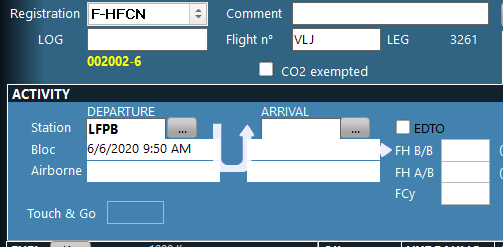
LOG: a yellow label is displayed just under the field to indicate the reference immediately following the last known LOG reference. If this reference is correct, just press ENTER and the proposed reference will be copied to the field value. If the proposed reference is not correct, fill the field as required.
Flight n°: the field is preset with the ICAO designator of the airline. Complete this value with the flight reference.
Departure station: preset with the last known arrival station
Departure date/hour bloc: is preset with the last known arrival time incremented by 10 minutes. Modify this value to reflect the accurate bloc departure time. The system will not accept any value prior to the default date and time.
5- Fill the activity, fuel, oil and hydraulic sections (refer to the TLB presentation for details about the field values)
Info: in the activity section, it is only necessary to specify the full date in the first field (departure bloc). For the three following fields, you can enter the hour only using the format HHMM and the system will autocomplete the date information.
Info: It is easier to use the tabulation key of your keyboard to change the current field instead of your mouse (your fingers will always be on the keyboard).
6- Press the Validate button (green button located on the right side of the screen) to post you changes to the server
7- Once the LEG is created, fill the TLB and the CREW sections
- to fill the CREW section, refer to the Crew on board article (left click on the list to add crew members)
- to fill the TLB section, refer to the recoding technical logs procedure
8- To add other LEGs, repeat this procedure from step 4
ADDITIONAL INFORMATION
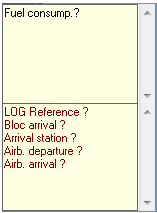
When creating or modifying a TLB, two information boxes are displayed on the bottom right corner of the screen. The lower box displays a list of required fields (in red). The validate button will return an error message if some of these fields was not properly set. The upper box displays recommended fields (in black):