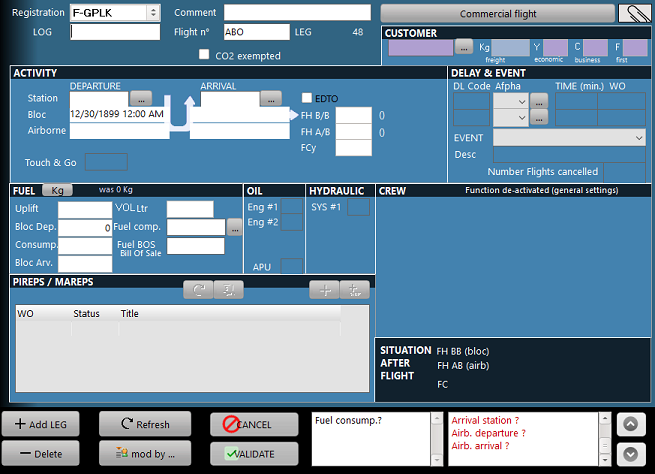
HEADER INFORMATION
- Registration: Registration of the concerned aircraft
- LOG: Reference of the LOG (or technical log) used to record the flight
- Comments: Any comments pertinent to the flight
- Flight n°: Flight number (ICAO designator of the operator + flight reference)
- Type: Identify the type of log book entry
Commercial flight: commercial flight
Ferry: Maintenance ferry flight
Set of flights: departures and arrivals are not recorded, an entire set of commercial flights is recorded on each leg (this option is only provided for rotor wings and general aviation aircraft. The concerned fleet must be set to allow multiple flights to be recorded at once)
Regularisation: the purpose of the entry is to adjust the aircraft flying hours and cycles
Maintenance: No flight is recorded on this technical log book entry, only maintenance inputs.
CUSTOMER
- Name: Name of the customer's company (the company must be defined as an operator in the contact manager)
- Freight Kg: Total weight of freight and mail (shall exclude the tare weight of all pallets and containers that are not payload, and the service weight)
- Y: economic class passengers on board
- C: business class passengers on board
- F: first class passengers on board
ACTIVITY
- Departure station: ICAO or IATA code of the departure airport
- Departure date/hour Bloc: Date and hour of block departure (format) (engine start)
- Departure date/hour Airb: Date and hour of airborne departure. Note that it is not required to repeat the entire date and hour here, simply enter "hhmm" ("1412" for "14h12min") and the entry will be completed
- Arrival date/hour Airb: Date and hour of airborne arrival
- Arrival date/hour Bloc: Date and hour of block arrival
- Arrival station: ICAO or IATA code of the arrival airport
- Touch & Go: Number of Touch & Go. Left blank if non-applicable
- FH B/B: block to block flight time (decimal representation)
- FH A/B: airborne flight time (decimal representation)
- FCy: number of flight cycle(s)
FUEL
- Lbs / Kg: this switch displays the current configuration of the aircraft regarding the fuel indication units. This should only be set at the aircraft delivery or when the aircraft is modified to display another unit. The fuel quantities defined in the following fields are defined using this unit.
- Uplift: Added fuel quantity
- Bloc Dep: Fuel on board at block departure
- Conso: Fuel consumption during the flight (block to block)
- Bloc Arv: Fuel on board at block arrival
- Fuel comp: Fueling company (must be defined as "fuel provider" in the contact manager)
- Fuel BOS: Reference of the Bill of sale.
OIL
These fields are used to set the oil quantity added to the engines and the APU.
The fields are displayed or hidden depending on the number of engines set for the concerned fleet
The quantity units are not specified and shall be the same as used on your technical log book (usually cans of 1/4 gallon)
HYDRAULIC
These fields are used to set the hydraulic fluid quantity added to the hydraulic systems.
The fields are displayed or hidden depending on the number of hydraulic systems set for the concerned fleet
The quantity units are not specified and shall be the same as used on your technical log book (usually cans of 1/4 gallon)
TLB PIREPS / MAREPS
This area displays the maintenance entries (Pireps: Pilot Reports / Mareps: Maintenance Reports) for the concerned leg.
The button functions are (from the left to the right):
- Refresh: refer to the data processing article
- Display the WO (Work Order) for the selected log book entry (switch to the M.Works module)
- Add a WO (switch to the M.Works module)
- Add a quick snag entry (refer to the quick snag)
DELAY
This area contains the two principal delays associated with the leg, when applicable.
- Code Num & Code Alpha: numeric and alphanumeric codification of the delay. Both fields are set simultaneously using the "..." button which displays the preset codes.
- Time (min): delay duration in minutes
- WO: if the delay concerns a technical code (41 to 49), defines the associated WO. The reference of the WO can be set by writing its reference in the cell of by dragging and dropping it from the WO column of the PIREPS/MAREPS section.
CREW
Displays the operating crew. This area is only visible if "display crew information on each leg" has been check in the general settings / base parameters.
To modify this list, right click on the list. For details, consult the crew on board article.
SITUATION AFTER FLIGHT
Displays the aircraft hours and cycles after the concerned flight (using the decimal and hh:mm formats)