To record technical logs (snags) on an existing LEG (using the quick snag module), proceed as follows:
1- Select the Activity module, if not already selected
-> the fleet list is displayed
2- In the fleet tab, double click on the concerned aircraft
-> the TLB Routes tab is displayed
3- in the Routes tab, double click on the concerned LEG
-> the TLB is displayed
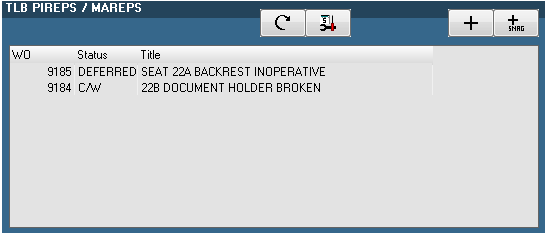
4- Click the "+ Snag" button located on the upper right corner of the TLB PIREPS/MAREPS section
-> the Quick Snag window is displayed
5- Origin: If the snag concerns a work which is already open then drag the related WO from the top list to the ORIGIN WO area
-> All fields are preset with the information of this WO
6- Works: Fill the WO (Work Order) title, ATA chapter, type, requested work / complaint, action as stated on the paper copy of the TLB
If the snag relates to an MEL item, the type of WO must be set to the related MEL category and the MEL item must be specified in the MEL field.
Specify if the snag is a PIREPS or MAREPS, if it has a commercial or operational impact on the aircraft, the compliance details.
7- Deferral: If the accomplished works are not considered as being a terminating action, then the C/W (complied with) check box must be unchecked and the deferral section must be filled. On the other hand, if the accomplished works are terminating, the C/W must be checked.
6- Press the Apply button to send the snag to the AMS server

-> The Quick Snag window closes and the TLB PIREPS/MAREPS section is updated to show this new snag.
7- To add other snags, repeat this procedure from step 4
ADDITIONAL INFORMATION
Info box
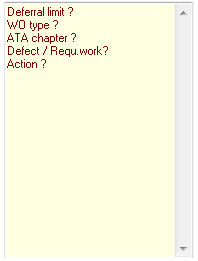
When using the Quick Snag window, an information box is displayed on the bottom right corner. This box displays a list of required fields (in red) and the snag cannot be validated if some fields are still required by this box.
Using the M.Works module to create / modify snags
The M.Works module can also be used to create or modify the technical logs entries.
To use the M.Works module from the TLB sheet, double click on a snag to view / modify it or click on the "+" button to create a snag using the M.Works module.
The M.Works module must be used (in place or in complement of the Quick Snag functions) to specify the component replaced (TAGs)